
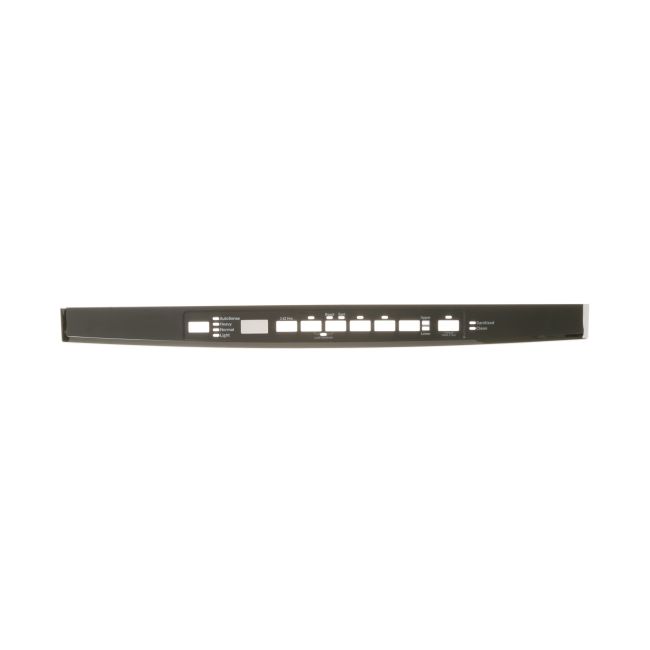
WD34X21699 General Electric Dishwasher Interface Cover
Availability:
In stock
In stock items are shipped the same day on all orders made before 4 PM Eastern Time. Orders made after 4 PM Eastern Time, Weekend or a Holiday will ship the following business day.
General Electric
MFG Number
WD34X21699
Manufactured BY:
General Electric
Part number WD34X21699 replaces: AP6037177, EAP11766992, PS11766992, 4466901.
Special Price
$62.99
Regular Price
$67.99
(7% off)
Dishwasher Interface Cover Description:
This product is compatible with various GE brands including Cafe, General Electric, Monogram, Haier, Hotpoint, and Profile. The Dishwasher Interface Cover serves as an OEM replacement part specifically crafted to encase the buttons and display of GE dishwashers. It's essential to understand that this item includes only the cover with graphics and does not come with the actual control mechanisms.
For safety, disconnect the dishwasher from power by unplugging it or turning off the house circuit breaker before starting the installation process. Generally, the installation reuses existing hardware as no additional hardware comes with this cover.
To install, begin by removing the screws that hold the old control panel in place. Next, remove the control board cover and the door latch assembly, and disconnect the ribbon connector. Install the new Interface Cover by reversing these steps. After reassembling, reconnect the dishwasher to the power supply.
This straightforward process does not require new hardware and utilizes the existing components for fitting the new cover.
This product is compatible with various GE brands including Cafe, General Electric, Monogram, Haier, Hotpoint, and Profile. The Dishwasher Interface Cover serves as an OEM replacement part specifically crafted to encase the buttons and display of GE dishwashers. It's essential to understand that this item includes only the cover with graphics and does not come with the actual control mechanisms.
For safety, disconnect the dishwasher from power by unplugging it or turning off the house circuit breaker before starting the installation process. Generally, the installation reuses existing hardware as no additional hardware comes with this cover.
To install, begin by removing the screws that hold the old control panel in place. Next, remove the control board cover and the door latch assembly, and disconnect the ribbon connector. Install the new Interface Cover by reversing these steps. After reassembling, reconnect the dishwasher to the power supply.
This straightforward process does not require new hardware and utilizes the existing components for fitting the new cover.
Write Your Own Review


ADD73697322 LG Refrigerator/Freezer Door Foam Assembly
Special Price
$394.99
Regular Price
$520.99
(24% off)
ACQ88716601 LG Refrigerator Motor Cover Assembly
Special Price
$192.99
Regular Price
$255.99
(25% off)