
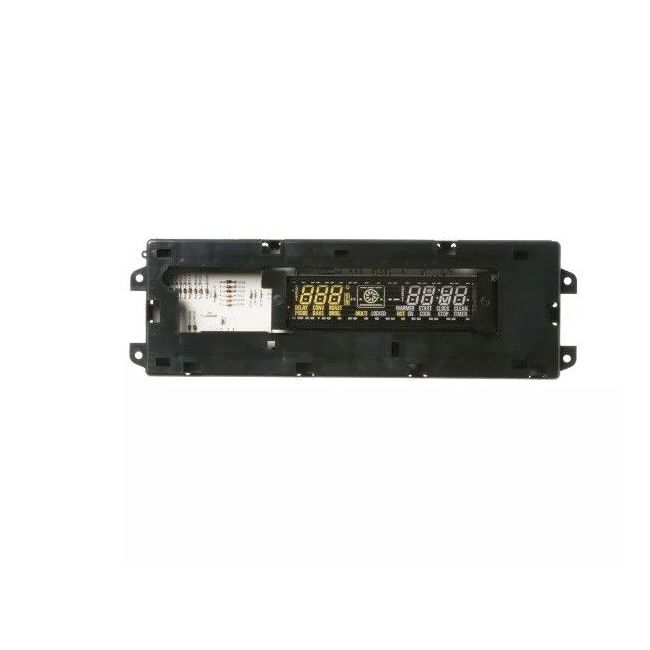
WB27T10312 General Electric Electronic Clock Control Assembly for Range/Stove/Oven
Availability:
No longer available
General Electric
MFG Number
WB27T10312
Manufactured BY:
General Electric
This manufacture part number # WB27T10312 replaces our competitor’s part numbers: AP3186178, 911161, AH238604, EA238604, PS238604, B001E8D1YE.
Special Price
$253.99
Regular Price
$450.99
(44% off)
Electronic Clock Control Assembly for Range/Stove/Oven.
This item is an OEM part compatible exclusively with GE ovens, including brands like Hotpoint, General Electric, and Sears-Kenmore. It serves as the central hub for managing oven operations, allowing users to set temperatures, view the time, use the timer, and switch between various oven functions.
Despite its durability, the oven control board may be susceptible to damage from moisture, excessive heat, and similar factors. Common indicators that the control board might require replacement are a non-functioning display or a non-responsive oven.
Replacement is necessary as the control board cannot be repaired. To replace it, ensure the oven is disconnected from power by unplugging it or turning off the circuit breaker. Next, remove the cover over the display to access the control board, which is secured by four screws. After removing these screws, disconnect the wiring harness. The installation of a new board is simply the reverse process.
This part is sold individually and is intended for use with GE ovens only.
This item is an OEM part compatible exclusively with GE ovens, including brands like Hotpoint, General Electric, and Sears-Kenmore. It serves as the central hub for managing oven operations, allowing users to set temperatures, view the time, use the timer, and switch between various oven functions.
Despite its durability, the oven control board may be susceptible to damage from moisture, excessive heat, and similar factors. Common indicators that the control board might require replacement are a non-functioning display or a non-responsive oven.
Replacement is necessary as the control board cannot be repaired. To replace it, ensure the oven is disconnected from power by unplugging it or turning off the circuit breaker. Next, remove the cover over the display to access the control board, which is secured by four screws. After removing these screws, disconnect the wiring harness. The installation of a new board is simply the reverse process.
This part is sold individually and is intended for use with GE ovens only.
Write Your Own Review


W11180283 Whirlpool Control Panel for Range/Stove/Oven
Special Price
$181.99
Regular Price
$311.99
(42% off)


W11393093 Whirlpool Electronic Control Board for Range, Stove, Oven
Special Price
$255.99
Regular Price
$395.99
(35% off)

W10884488 Whirlpool Control Board for Range/Oven
Special Price
$262.99
Regular Price
$335.99
(22% off)