
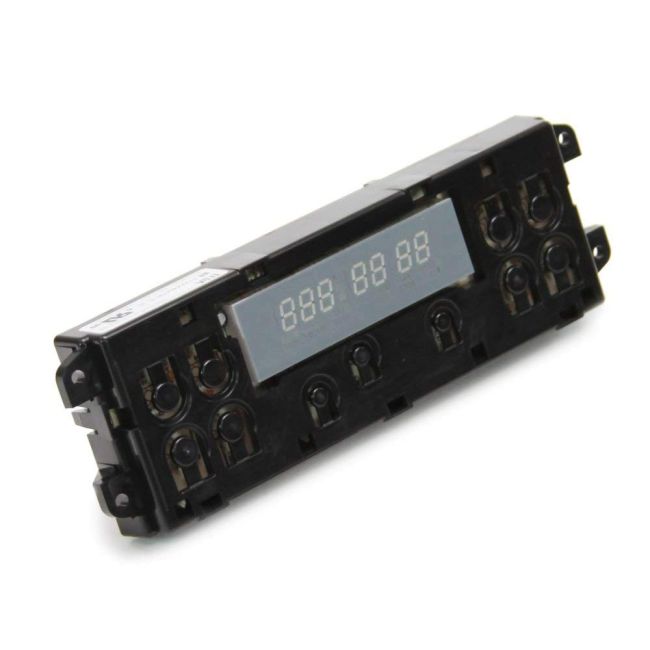
WB27T10409 General Electric Range/Stove/Oven Electronic Clock Oven Control
Availability:
In stock
In stock items are shipped the same day on all orders made before 4 PM Eastern Time. Orders made after 4 PM Eastern Time, Weekend or a Holiday will ship the following business day.
General Electric
MFG Number
WB27T10409
Manufactured BY:
General Electric
This manufacture part number # WB27T10409 replaces our competitor’s part numbers: AP3202829, 963826, AH753782, EA753782, PS753782, B00MJSBQEK.
Special Price
$186.99
Regular Price
$264.99
(29% off)
Range/Stove/Oven Electronic Clock Oven Control
GE products, including Hotpoint, General Electric, and Sears-Kenmore, use this OEM replacement part—a control board for ovens. The control board functions as the oven's main computer, managing essential operations such as baking, temperature maintenance, and power control. If the oven fails to turn on or displays an error code, the control board may be faulty and require replacement.
To replace the control board, first unplug the oven. After ensuring the power is off, remove the upper back panel of the range. Access the old control board and release it from the locking tabs. Take a photo of the wire orientation for reference. Disconnect the wire harness and individual wires from the old board, then connect them to the corresponding terminals on the new board. Snap the new board into place and reattach the upper back panel.
This genuine replacement part is sold individually and is compatible with ovens from General Electric, Hotpoint, and RCA.
GE products, including Hotpoint, General Electric, and Sears-Kenmore, use this OEM replacement part—a control board for ovens. The control board functions as the oven's main computer, managing essential operations such as baking, temperature maintenance, and power control. If the oven fails to turn on or displays an error code, the control board may be faulty and require replacement.
To replace the control board, first unplug the oven. After ensuring the power is off, remove the upper back panel of the range. Access the old control board and release it from the locking tabs. Take a photo of the wire orientation for reference. Disconnect the wire harness and individual wires from the old board, then connect them to the corresponding terminals on the new board. Snap the new board into place and reattach the upper back panel.
This genuine replacement part is sold individually and is compatible with ovens from General Electric, Hotpoint, and RCA.
Write Your Own Review

W11536796 Whirlpool Oven Control Board for Ranges
Special Price
$198.99
Regular Price
$285.99
(30% off)


W11297709 Whirlpool Console for Ranges, Stoves, Ovens
Special Price
$388.99
Regular Price
$535.99
(27% off)


00652271 Bosch Range Vent Hood Main Control Board
Special Price
$497.99
Regular Price
$665.99
(25% off)
