
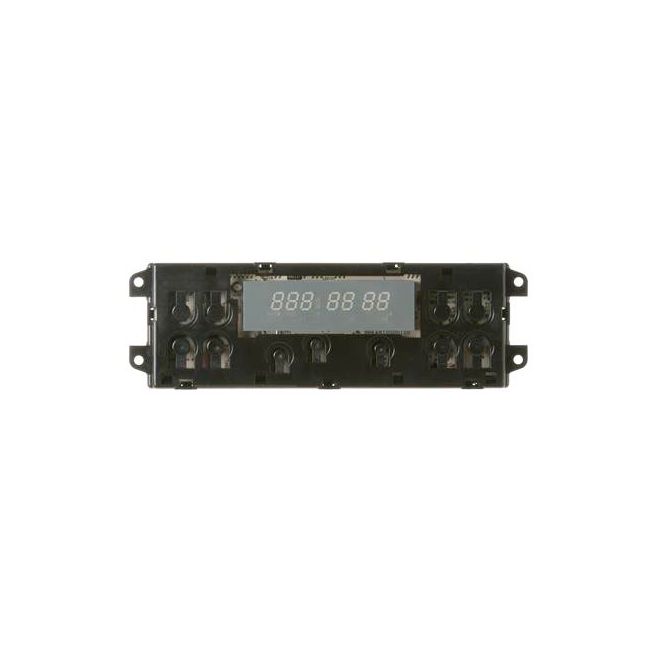
WB27T10416 General Electric Electronic Clock Control for Range/Stove/Oven
Availability:
No longer available
General Electric
MFG Number
WB27T10416
Manufactured BY:
General Electric
This manufacture part number # WB27T10416 replaces our competitor’s part numbers: AP3205899, 963830, AH753786, EA753786, PS753786, B00MOCQCPE.
Special Price
$203.99
Regular Price
$372.99
(45% off)
Electronic Clock Control for Range/Stove/Oven
This oven control board is a genuine replacement part compatible with GE, Hotpoint, and Sears-Kenmore products. It serves as the main circuit board, managing the key functions of your oven. If your oven isn't heating correctly, fails to turn on, or displays an error code, the control board may need replacement. Though it might seem challenging, replacing the control board is fairly straightforward.
Begin by unplugging the range and moving it away from the wall. Remove the upper back panel to access the control board. Use a phone camera to note the wire orientation. Detach the wire harness from the old control board and remove any individual wires with needle-nose pliers. Attach the wires to the new control board, ensuring they connect to the correct terminals. Snap the new control board into place and reinstall the upper back panel.
This OEM part is designed to work with General Electric, Hotpoint, and RCA brand ovens.
This oven control board is a genuine replacement part compatible with GE, Hotpoint, and Sears-Kenmore products. It serves as the main circuit board, managing the key functions of your oven. If your oven isn't heating correctly, fails to turn on, or displays an error code, the control board may need replacement. Though it might seem challenging, replacing the control board is fairly straightforward.
Begin by unplugging the range and moving it away from the wall. Remove the upper back panel to access the control board. Use a phone camera to note the wire orientation. Detach the wire harness from the old control board and remove any individual wires with needle-nose pliers. Attach the wires to the new control board, ensuring they connect to the correct terminals. Snap the new control board into place and reinstall the upper back panel.
This OEM part is designed to work with General Electric, Hotpoint, and RCA brand ovens.
Write Your Own Review
5304516862 Frigidaire Control Board for Range/Stove/Oven
Special Price
$185.99
Regular Price
$252.00
(26% off)

316418554 Frigidaire Electronic Control for Range/Stove/Oven
Special Price
$267.99
Regular Price
$373.99
(28% off)

WB27K10245 General Electric Range, Stove, Oven Clock Control Board
Special Price
$166.99
Regular Price
$231.99
(28% off)

WPW10734601 Whirlpool Oven Control Board for Range or Stove
Special Price
$260.99
Regular Price
$442.99
(41% off)

WB27X33086 General Electric Induction Control Assembly Kit
Special Price
$289.99
Regular Price
$390.99
(26% off)