
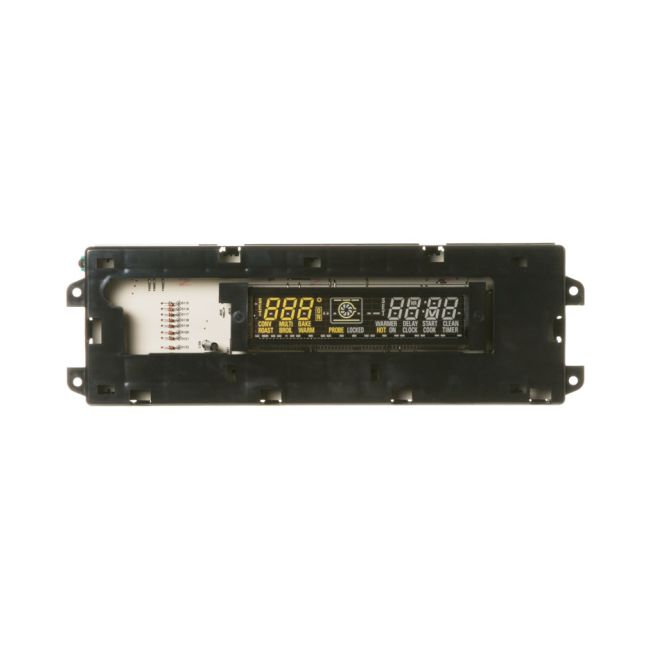
WB27K10145 General Electric Glass Touch Electronic Control Board for Range/Stove/Oven
Availability:
No longer available
General Electric
MFG Number
WB27K10145
Manufactured BY:
General Electric
This manufacture part number # WB27K10145 replaces our competitor’s part numbers: AP3778818, 1086150, AH953676, EA953676, PS953676, WB27K10087, B004Q41FZA.
Special Price
$294.00
Regular Price
$341.00
(14% off)
Glass Touch Electronic Control Board for Range/Stove/Oven.
This genuine OEM replacement part is designed for various oven models manufactured by General Electric, Hotpoint, and RCA. It serves as the central control unit for the oven's glass touchpad, managing settings and essential operations. If the touchpad becomes unresponsive, it may indicate a need for replacement of the control board.
Replacing the glass touch electronic control board is relatively straightforward. Begin by ensuring the oven is disconnected from power, either by unplugging it or switching off the circuit breaker. Move the oven away from the wall to access the rear panel. After removing this panel, locate the control board, detach it from its brackets, and disconnect the wire harness and individual wires. Remember the configuration of the wires. Attach these wires and the harness to the corresponding terminals on the new control board, secure it in place, and then replace the rear panel.
This part is compatible with ovens from brands like General Electric, Hotpoint, and RCA, ensuring a proper fit and reliable performance.
This genuine OEM replacement part is designed for various oven models manufactured by General Electric, Hotpoint, and RCA. It serves as the central control unit for the oven's glass touchpad, managing settings and essential operations. If the touchpad becomes unresponsive, it may indicate a need for replacement of the control board.
Replacing the glass touch electronic control board is relatively straightforward. Begin by ensuring the oven is disconnected from power, either by unplugging it or switching off the circuit breaker. Move the oven away from the wall to access the rear panel. After removing this panel, locate the control board, detach it from its brackets, and disconnect the wire harness and individual wires. Remember the configuration of the wires. Attach these wires and the harness to the corresponding terminals on the new control board, secure it in place, and then replace the rear panel.
This part is compatible with ovens from brands like General Electric, Hotpoint, and RCA, ensuring a proper fit and reliable performance.
Write Your Own Review

WB27T11430 General Electric Electric Range-Stove Display Control Board
Special Price
$286.99
Regular Price
$403.99
(29% off)


W11567348 Whirlpool Range/Stove/Oven Control Board
Special Price
$194.99
Regular Price
$266.99
(27% off)


WB03X10316 General Electric Chrome Gas Cooktop Surface Burner Control Knob
Special Price
$35.99
Regular Price
$55.99
(36% off)
