
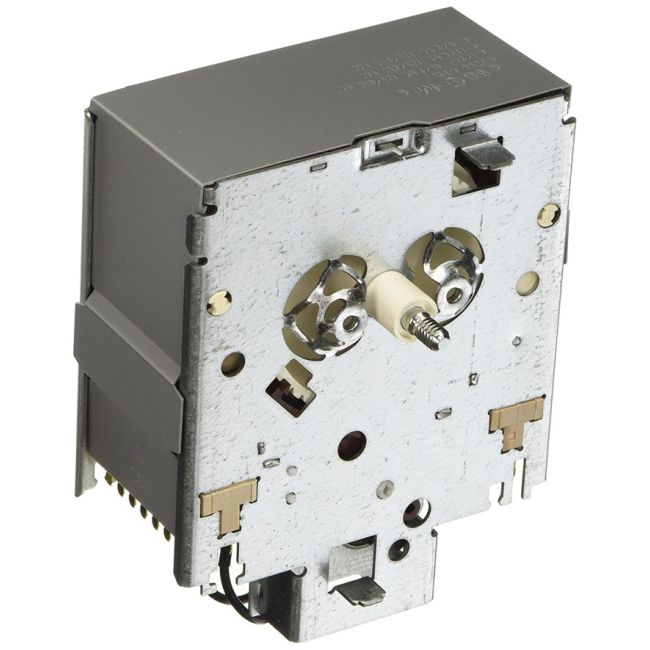
WH12X10152 General Electric Washing Machine Timer
Availability:
In stock
In stock items are shipped the same day on all orders made before 4 PM Eastern Time. Orders made after 4 PM Eastern Time, Weekend or a Holiday will ship the following business day.
General Electric
MFG Number
WH12X10152
Manufactured BY:
General Electric
This manufacture part number # WH12X10152 replaces our competitor’s part numbers: AP2620106, 877726, AH269881, EA269881, PS269881, B00MOD3E2W, 011-97523-01, 0197A1, 131802100H.
Special Price
$200.99
Regular Price
$284.99
(29% off)
Washing Machine Timer
The washing machine timer manages key functions such as water levels, tub filling and emptying, cycle durations, and sequence settings. It is compatible with GE brands including Hotpoint, General Electric, and Sears-Kenmore.
This genuine replacement part ensures your washer operates efficiently. Over time, the timer may wear out and stop functioning correctly. When this happens, it needs to be replaced.
To replace the timer, follow these steps:
1. Remove the control panel by unscrewing the mounting screws.
2. Tilt the control panel up to access the timer.
3. Use needle-nose pliers to grip and remove the rotating centerpiece.
4. Pull off the timer knob and dial from the front of the control panel.
5. Disconnect the two wire harnesses.
6. Slide the old timer out of its position.
7. Align the new timer with the four mounting tabs and slide it in until it locks into place.
8. Reconnect the wires to their correct terminals and secure the control panel.
This OEM part is sourced directly from the manufacturer and fits General Electric, Hotpoint, and RCA washing machines.
The washing machine timer manages key functions such as water levels, tub filling and emptying, cycle durations, and sequence settings. It is compatible with GE brands including Hotpoint, General Electric, and Sears-Kenmore.
This genuine replacement part ensures your washer operates efficiently. Over time, the timer may wear out and stop functioning correctly. When this happens, it needs to be replaced.
To replace the timer, follow these steps:
1. Remove the control panel by unscrewing the mounting screws.
2. Tilt the control panel up to access the timer.
3. Use needle-nose pliers to grip and remove the rotating centerpiece.
4. Pull off the timer knob and dial from the front of the control panel.
5. Disconnect the two wire harnesses.
6. Slide the old timer out of its position.
7. Align the new timer with the four mounting tabs and slide it in until it locks into place.
8. Reconnect the wires to their correct terminals and secure the control panel.
This OEM part is sourced directly from the manufacturer and fits General Electric, Hotpoint, and RCA washing machines.
Write Your Own Review

W10875909 Whirlpool Washer/Dryer Combo Timer Knob
Special Price
$29.99
Regular Price
$42.99
(30% off)


WP8546681 Whirlpool Washing Machine Control Timer
Special Price
$157.99
Regular Price
$288.99
(45% off)


WH12X10527 General Electric Washing Machine Timer
Special Price
$82.99
Regular Price
$89.99
(8% off)