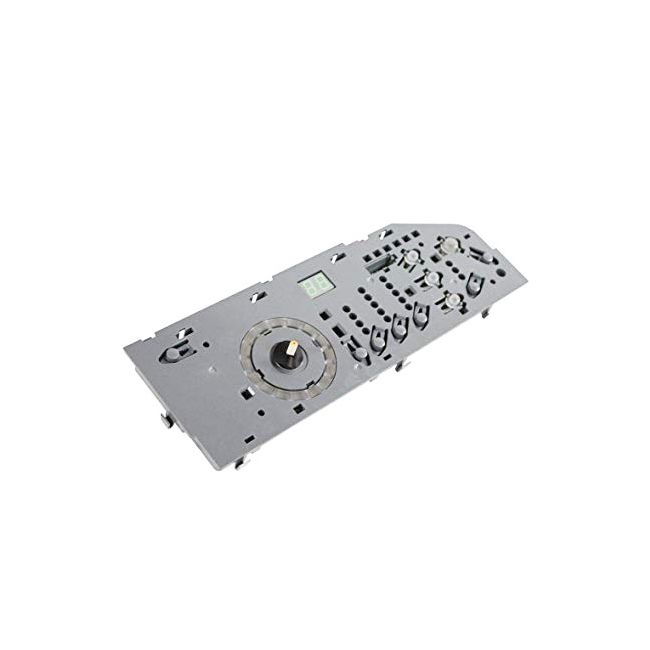
WP8563974 Whirlpool Dryer User Control and Display Board
Availability:
No longer available
Whirlpool
MFG Number
WP8563974
Manufactured BY:
Whirlpool
This manufacture part number # WP8563974 replaces our competitor’s part numbers: AP6013308, 8563974, PS11746534, 1201400.
Special Price
$164.99
Regular Price
$230.99
(29% off)
The Dryer User Control and Display Board is an essential component for managing your dryer’s functions. Whirlpool manufactures this part, which is compatible with various brands such as Whirlpool, Amana, KitchenAid, Maytag, Jenn-Air, Magic Chef, Roper, and Admiral. Additionally, Whirlpool produces similar parts for Sears-Kenmore and Ikea.
This board allows users to set dryer cycle times and control other dryer functions, including temperature settings. If the board malfunctions, you might experience issues like the dryer not starting, not heating properly, or not shutting off. In such cases, replacing the board is necessary.
To replace the board, first ensure the dryer is disconnected from the power source. Move the dryer away from the wall to access the back panel. Use a screwdriver to remove the screws securing the cover, then slide the cover forward and lift it off. Remove the screws on the control board bracket, tip the assembly into the dryer, and press the clips to disconnect the cables. Install the new board in place of the old one.
This user control and display board is an authentic OEM replacement part, suitable for Estate, Roper, KitchenAid, and Whirlpool dryers. It is sold individually.
This board allows users to set dryer cycle times and control other dryer functions, including temperature settings. If the board malfunctions, you might experience issues like the dryer not starting, not heating properly, or not shutting off. In such cases, replacing the board is necessary.
To replace the board, first ensure the dryer is disconnected from the power source. Move the dryer away from the wall to access the back panel. Use a screwdriver to remove the screws securing the cover, then slide the cover forward and lift it off. Remove the screws on the control board bracket, tip the assembly into the dryer, and press the clips to disconnect the cables. Install the new board in place of the old one.
This user control and display board is an authentic OEM replacement part, suitable for Estate, Roper, KitchenAid, and Whirlpool dryers. It is sold individually.
Write Your Own Review

WR17X31816 General Electric Water Filter Manifold
Special Price
$66.99
Regular Price
$82.99
(19% off)